
Understanding Console and Management Port
When setting up or troubleshooting a network device such as a switch or router, you'll often come across two special ports dedicated to device administration:
- Console Port
- Management Port
At first glance, both appear to serve the same purpose: allowing administrators to manage the device. However, they are designed for different use cases and operate very differently under the hood.
Understanding these differences is important not only for network engineers but also for anyone learning how modern networking devices are architected.
The Architecture of a Modern Network Device
Before diving into individual ports, let's understand the high-level architecture of a switch or router.
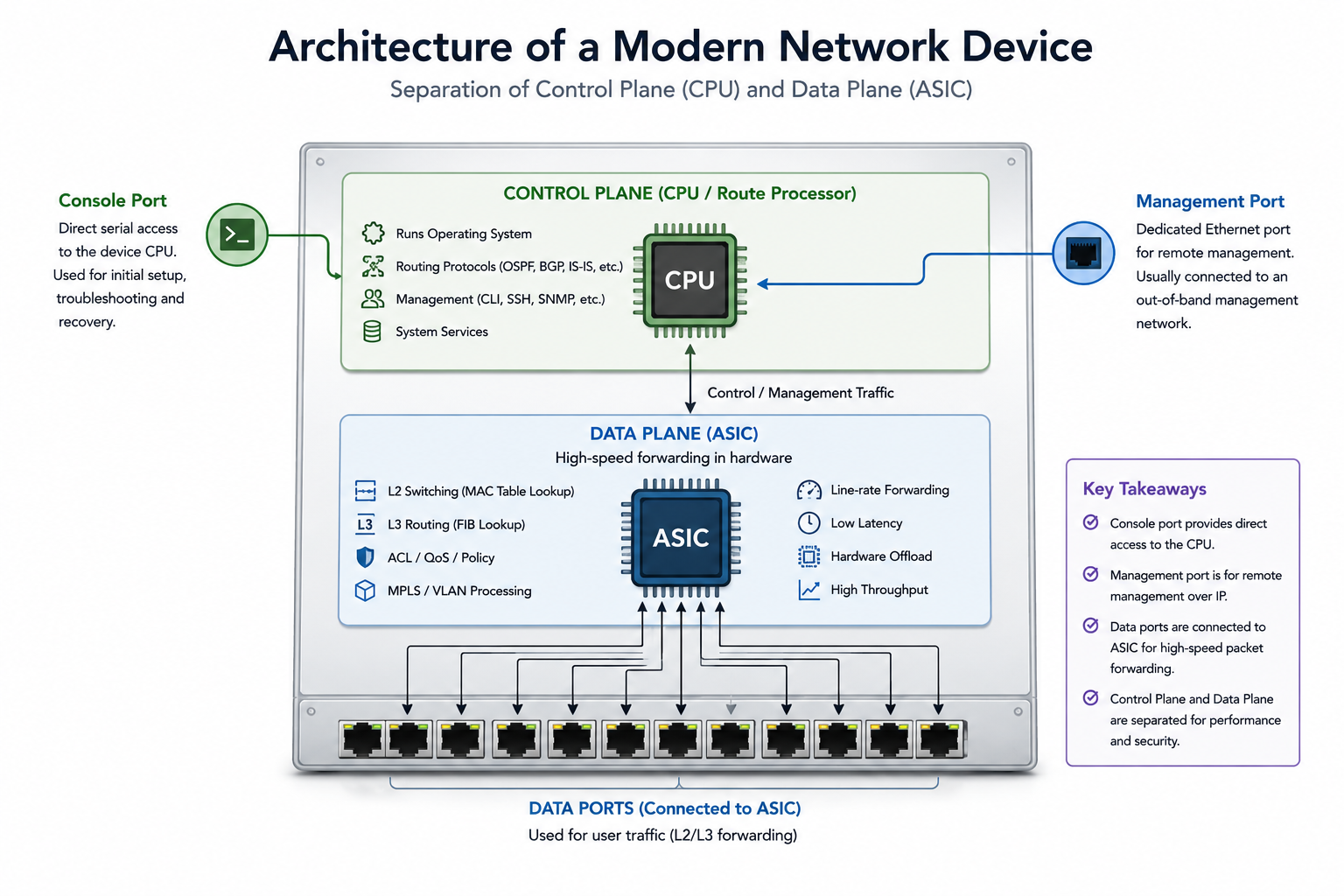
A network device is typically divided into two major components:
Control Plane
The control plane is responsible for:
- Running the operating system
- Processing routing protocols (OSPF, ISIS, BGP, etc.)
- Managing device configuration
- Handling management traffic
- Making forwarding decisions
This functionality runs on the device CPU (or Route Processor).
Data Plane
The data plane is responsible for:
- Forwarding packets
- Switching traffic
- MPLS label operations
- ACL lookups
- High-speed packet processing
These tasks are handled by specialized hardware called ASICs (Application-Specific Integrated Circuits).
This separation allows modern devices to forward packets at line rate while keeping management and routing functions isolated.
Identifying Console and Management Ports on a Switch
When looking at an enterprise switch for the first time, it is common to assume that all RJ45 ports are Ethernet interfaces.
However, many switches include dedicated Console and Management ports that look very similar from the outside but serve completely different purposes.
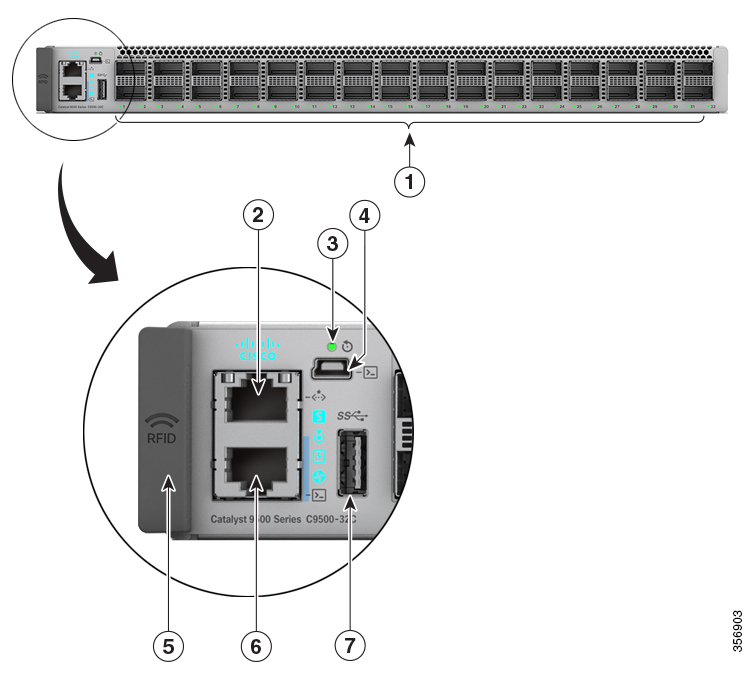
*Figure: Console and Management ports on a Cisco Catalyst switch.*
What You Are Looking At
The highlighted section contains:
- RJ45 Console Port
- Management Ethernet Port (Mgmt0)
- USB Console Port
At first glance, the RJ45 console port and management port appear almost identical because both use an RJ45 connector.
This often leads to confusion for engineers who are new to networking.
Same Connector, Different Purpose
Although both ports use an RJ45 connector, they operate very differently.
| Port | Physical Connector | Purpose |
| Port | Physical Connector | Purpose |
|---|---|---|
| RJ45 Console Port | RJ45 | Direct serial access to the CPU |
| Management Port | RJ45 Ethernet | Remote management over IP |
| Data Ports | RJ45/SFP/QSFP | User traffic forwarding |
The key takeaway is:
RJ45 is just a physical connector type. It does not determine how the interface operates.
A console port may use an RJ45 connector while carrying serial communication, whereas a management port uses the same connector for Ethernet communication.
What is a Console Port?
A console port provides direct access to the device's control plane through a serial connection.
Unlike Ethernet interfaces, a console connection does not require:
- IP connectivity
- Routing
- Switching
- Network reachability
The console port communicates directly with the CPU.
Laptop


Console Cable


Console Port


CPU / Route Processor
When you enter a command:
show version
the command is processed directly by the operating system running on the CPU.
Why is the Console Port Special?
Since the console port bypasses the data plane entirely, it remains operational even when the network is completely broken.
For example:
- Routing configuration is incorrect
- VLANs are misconfigured
- Management IP is unreachable
- Forwarding ASICs are not functioning properly
In all these cases, console access is typically still available.
This makes it the most reliable way to access a device during failures.
Common Uses of the Console Port
Initial Device Setup
A brand-new switch or router usually has no management IP configured.
To perform the initial setup, engineers connect through the console port and configure:
- Hostname
- User accounts
- Passwords
- Management IP address
- Routing protocols
- VLANs
Password Recovery
Most password recovery procedures require console access.
Software Recovery
If a device enters ROMMON, bootloader mode, or experiences a failed software upgrade, recovery is usually performed through the console.
Troubleshooting
When all remote access methods fail, the console provides a direct path to the device.
What is a Management Port?
A management port is a dedicated Ethernet interface used for remote administration.
Unlike the console port, the management port requires:
- An IP address
- Network connectivity
The management interface is usually connected directly to the control plane rather than the forwarding ASICs.
Administrator PC


 Management Network


 Management Port


     CPU / RP
This allows administrators to manage the device remotely without using production traffic interfaces.
Common Uses of the Management Port
Remote Access
Engineers can connect remotely using:
- SSH
- HTTPS
- Telnet (legacy environments)
Monitoring
Network monitoring systems use the management interface for:
- SNMP
- Telemetry
- Logging
- Health monitoring
Automation
Automation frameworks such as Ansible can push configurations through the management interface.
Out-of-Band Management
Many organizations build a dedicated management network that is completely separate from the production network.
This is known as an Out-of-Band (OOB) management network.
Even if the production network fails, administrators can still access devices through the management network.
What About Regular Ethernet Interfaces?
Regular Ethernet interfaces are different from both console and management ports.
They are connected to forwarding ASICs and are designed to carry user traffic.
Incoming Packet


Ethernet Interface


      ASIC


Forwarding Lookup


Outgoing Interface
Most packets entering these interfaces are forwarded entirely in hardware without involving the CPU.
This is what enables modern switches and routers to process millions of packets per second.
Why Can't We Just Use Data Interfaces for Management?
Technically, we can.
For example:
interface GigabitEthernet0/0
 ipv4 address 10.1.1.1 255.255.255.0
Administrators can SSH directly to this interface.
However, there are several drawbacks:
- Management traffic shares the same network as production traffic.
- Routing failures can make the device unreachable.
- Security policies become more complicated.
- Troubleshooting becomes harder during outages.
A dedicated management interface provides better isolation and reliability.
Console Port vs Management Port
| Feature | Console Port | Management Port |
| Feature | Console Port | Management Port |
|---|---|---|
| Connection Type | Serial | Ethernet |
| Requires IP Address | No | Yes |
| Connected To | CPU / Route Processor | CPU / Route Processor |
| Uses ASICs | No | Typically No |
| Initial Setup | Yes | No |
| Remote Access | No | Yes |
| SSH Access | No | Yes |
| Password Recovery | Yes | No |
| Works During Network Failures | Yes | Usually Yes (if OOB network exists) |
| Primary Purpose | Local Access | Remote Administration |
A Real-World Scenario
Imagine a router deployed in a data center. On a normal day:- Engineers SSH into the management IP.
- Monitoring tools collect telemetry.
- Automation systems push configuration updates.
- Production traffic stops.
- SSH becomes unreachable.
- Monitoring systems lose connectivity.
- Data interfaces are still present but inaccessible.
- The management network may or may not be reachable.
- The console port remains available.
Conclusion
Although the console port and management port are both used to administer network devices, they serve different purposes. The console port provides direct access to the control plane and remains available even when the network is completely unavailable. The management port enables convenient remote administration through IP-based protocols and is often connected to a dedicated management network. Understanding how these ports are connected internally—specifically their relationship with the CPU and forwarding ASICs—helps explain why they behave differently during failures. In short:- Console Port = Local access directly to the control plane
- Management Port = Remote access to the control plane
- Data Ports = High-speed packet forwarding through ASICs