
How Packet Flow Works in a Layer 2 Network
Every time one machine on your network talks to another, there's a small sequence of decisions happening before a single byte of actual data moves. Figuring out who the destination is, finding their hardware address, and routing through a switch that's quietly learning as it goes. Most of this happens in milliseconds and is completely invisible to us, but it's worth tracing through once, step by step.
Here's the setup we'll use: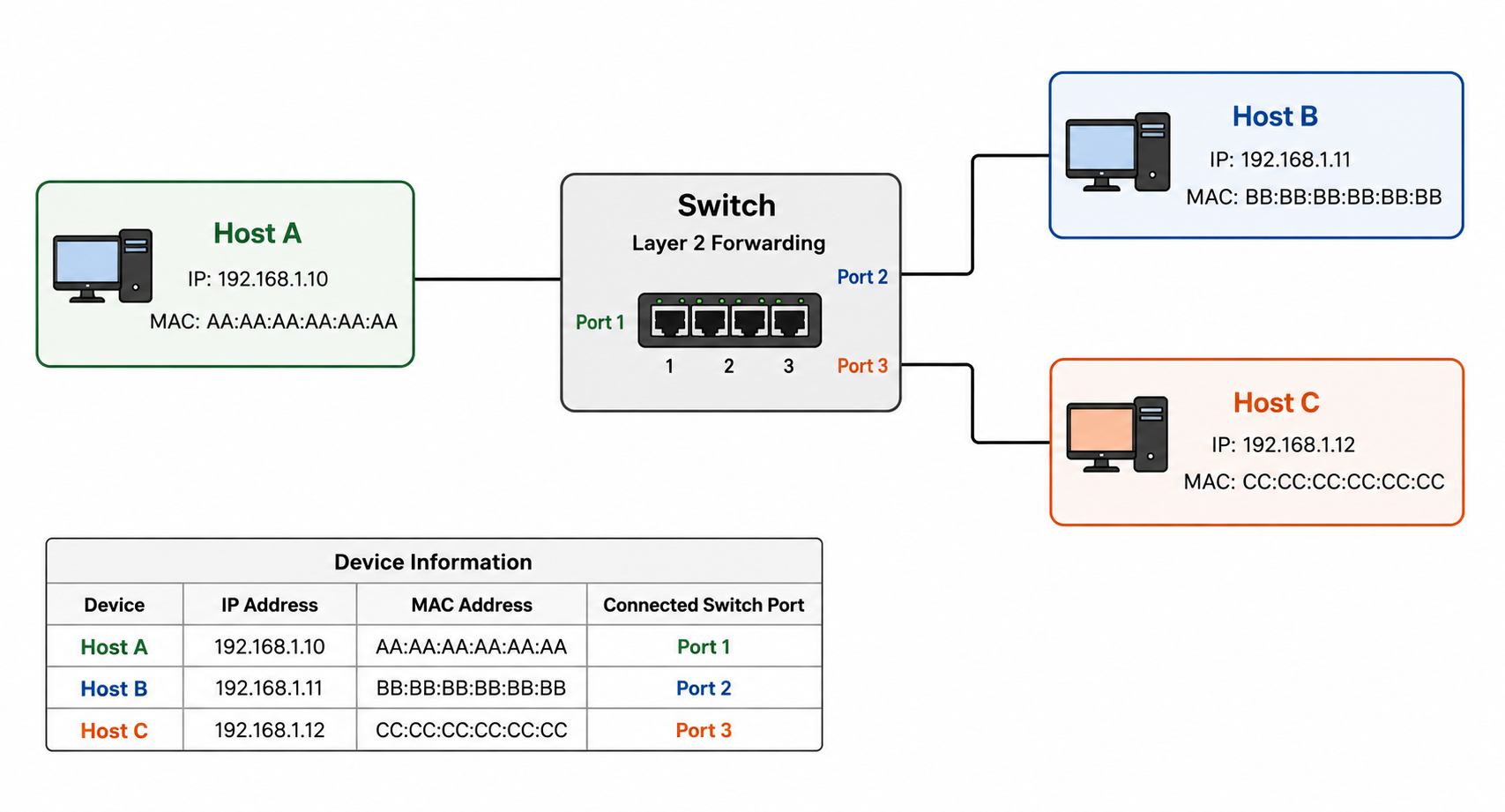
Host A wants to send a packet to Host B. Let's follow that packet from the moment it's created to the moment it lands.
Step 1: Is the destination local or remote?
Before Host A does anything else, it looks at Host B's IP address and compares it against its own subnet. If Host B's IP falls within the same subnet, Host A treats it as local, reachable directly without leaving the network. If it didn't, Host A would instead send the packet toward its default gateway, since reaching a remote network requires routing. For this story, Host B is local, so Host A can talk to it directly.
Step 2: Does Host A already know Host B's MAC address?
Knowing Host B's IP address isn't enough to actually send a frame. Ethernet only understands MAC addresses. So Host A checks its ARP cache, a small local table that remembers IP-to-MAC mappings it has learned before.
- If an entry for Host B already exists, Host A uses it immediately and skips straight to building the frame.
- If there's no entry, Host A needs to ask the network: *"Who has this IP address?"*
Let's assume this is a fresh conversation, so the cache comes up empty.
Step 3: Host A broadcasts an ARP request
Host A creates an ARP request, a frame addressed to the special broadcast MAC address
ff:ff:ff:ff:ff:ff, and sends it out toward the switch. This frame essentially asks every device on the network: *"Who has this IP? Reply directly to me."*Step 4: The switch floods it and learns from it
The switch receives this frame and checks the destination MAC address. Since it's the broadcast address, the switch has no real decision to make. It floods the frame out every port except the one it arrived on.
But before doing that, the switch quietly does something useful for itself. It looks at the source MAC address of the incoming frame and records it in its MAC address table, mapping that MAC to the port it just came in on. This is how a switch builds its understanding of the network, not through configuration, but simply by watching the source address of every frame that passes through it.
Step 5: One host ignores it, the other replies
Both Host B and Host C receive the broadcast. Host C checks the destination IP in the request, sees it doesn't match its own address, and discards the frame. Nothing to do here.
Host B, on the other hand, recognizes the request as meant for it. It prepares an ARP reply and sends it back, this time as a unicast frame, addressed directly to Host A's MAC address rather than broadcast to everyone.
Step 6: The switch learns again, and forwards precisely
The reply arrives at the switch on the port connected to Host B. Same routine as before: the switch reads the source MAC and updates its MAC table, now also mapping Host B's MAC to its port.
This time, though, the switch doesn't need to flood anything. It already knows which port Host A is on from Step 4, so it forwards the reply directly out that single port. A precise hop instead of a broadcast.
Step 7: Host A caches the answer and sends the real packet
The reply reaches Host A, which stores the mapping in its ARP cache. With Host B's MAC address now known, Host A can finally build and send the original packet it wanted to send from the very beginning.
Step 8: Every packet after this one is instant
The next time Host A needs to talk to Host B, none of this repeats. The entry is already sitting in Host A's ARP cache, so it goes straight to building the frame. No broadcast, no waiting on a reply.
What if Host B moves to a different port?
Say someone unplugs Host B from Port 2 and plugs it into Port 4 instead. The switch doesn't know this happened. It still has the old entry sitting in its MAC table:
BB:BB:BB:BB:BB:BB → Port 2
If Host A sends a frame to Host B right now, the switch trusts its table and forwards the frame out Port 2, and the frame goes nowhere, because Host B isn't there anymore. The entry is stale, and the switch has no way of knowing that on its own.
There are two ways this corrects itself, and they happen on very different timescales.
The fast path: Host B transmits something. The moment Host B sends any frame at all from its new location, even something unrelated to this conversation like its own ARP request, that frame arrives at the switch on Port 4 with source MAC
BB:BB:BB:BB:BB:BB. The switch's learning rule doesn't check whether it already has an entry for this MAC. It just trusts whatever it sees most recently. So it immediately overwrites the table:BB:BB:BB:BB:BB:BB → Port 4
From that point on, every frame addressed to Host B is forwarded correctly.
The slow path: Host B stays quiet. If Host B doesn't transmit anything, the stale entry just sits there. Switches don't keep MAC table entries forever. Each one has an aging timer (300 seconds is a common default), and if no frame with that source MAC is seen within that window, the entry is removed. Once it's gone, the next frame addressed to Host B has no matching entry, so the switch falls back to flooding it out every port, exactly like it did for the very first ARP request in this story. That flood reaches Host B on Port 4 regardless of which port the switch thinks it's on, and any reply Host B sends back re-teaches the switch the correct port.
So in the worst case, there's a window, anywhere from a few frames to the full aging timeout, where traffic to Host B silently fails, until either Host B speaks up or the stale entry simply expires.
What if Host B's MAC address changes?
This happens more often than it sounds. A NIC gets replaced, a VM gets migrated to different hardware, a network card gets reset. The IP stays
192.168.1.11, but the MAC behind it is now something new.The problem is entirely on Host A's side this time. Its ARP cache still has the old mapping:
192.168.1.11 → BB:BB:BB:BB:BB:BB (stale)
Until something changes that, Host A will keep addressing frames to a MAC address that no longer answers. Two things can fix it.
ARP cache entries expire too. Just like the switch's MAC table, a host's ARP cache entries have their own timeout, typically a couple of minutes, depending on the OS. Once the entry expires, Host A doesn't have anything cached for
192.168.1.11, so the very next time it needs to talk to that IP, it goes through the full ARP request and reply exchange again, and whatever MAC replies becomes the new cached value.Or the new host announces itself with a gratuitous ARP. Rather than waiting for someone to ask, a host can broadcast an unsolicited ARP reply the moment it comes online with a new MAC: *"192.168.1.11 is now at this new MAC, update your records."* Any host that receives this, including Host A, overwrites its cache entry immediately, even if the old one hadn't expired yet. This is the same mechanism behind things like failover clusters and VM migrations updating the network within milliseconds instead of waiting out a timeout.
In both cases, the switch's MAC table and a host's ARP cache, the underlying rule is identical: whatever was learned most recently wins. Neither table verifies anything. They just trust the latest observation and overwrite the old one.
Wrapping up
That's really the whole story of how Host A gets a packet to Host B on the same network. Strip away the steps and it comes down to two things working together. ARP lets a host trade an IP address it knows for a MAC address it doesn't, and the switch's MAC table lets it stop guessing and start forwarding precisely, simply by watching the source address of every frame it sees.